• 0 Shopping Cart
Announcements Knowledgebase Submit a Ticket Network Status Contact Us
  • Account
    • Login
    • Forgot Password?
MyWebsiteHost
  • Home
  • Websites & Email
    Weebly Website Builder Create the perfect site with powerful drag and drop tools Professional Email Hosting Powerful email and productivity apps designed for businesses of all sizes. Email Security Keep spam and email threats out of your inbox.
  • Security & Tools
    SSL Certificates Secure your site and add trust & confidence for your visitors. SEO Tools Put your SEO plan into action and get a monthly progress report SocialBee SocialBee, the easiest way to manage all of your social media accounts. Site & Server Monitoring Find your website's problems before your visitors do! Website Security Scan your website for malware and protect online reputation. Website Backup Protect your website with daily automated backups. NordVPN Secure your connection and hide your IP.
  • Domains
    Register a New Domain Secure your domain name by registering it today. Transfer Domains to Us Transfer now to extend your domain by 1 year.
  • More
    1. Home
    2. Knowledgebase
    3. WordPress
    4. How to Change the Password of a WordPress Account

      Categories

    Backup/Restore
    4
    CloudLinux (cPanel)
    10
    cPanel - Control Panel
    24
    Databases
    11
    DirectAdmin
    48
    DNS - Nameservers
    6
    Domain Management
    10
    FTP
    9
    Installing a Control Panel
    6
    Mobile
    11
    Others
    3
    PayPal
    7
    Plesk
    47
    Security
    10
    Site Builder
    9
    SiteWorx/InterWorx
    58
    Softaculous
    69
    SolusVM
    18
    SSL
    5
    Virtualizor
    19
    WHM
    18
    WordPress
    17

      Categories

      Tag Cloud

    SitebBuilder

      Support

    My Support Tickets
    Announcements
    Knowledgebase
    Downloads
    Network Status
    Open Ticket

    How to Change the Password of a WordPress Account Print

    • 0

    You can easily change the password if you have access to your WordPress account.


    1. Log in to the WordPress dashboard.

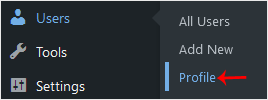
    2. From the Dashboard menu, go to Users and click on Profile.


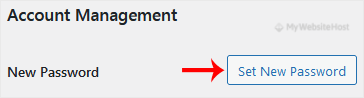
    3. Scroll down to Account Management and click on Set New Password.


    4. Copy the password to a safe place and click on Update Profile to change your password.


    Was this answer helpful?

    Related Articles

    How to Remove Sample Comments and Posts From WordPress You get sample comments and posts in a fresh WordPress install. You can easily remove them in the... How to Remove a Post in WordPress You can remove the published or draft post in WordPress.1. Log in to the WordPress dashboard. 2.... How to Bulk Delete Posts in WordPress It is possible to delete posts in bulk using WordPress. You can also delete selected posts in... How to Delete an Uncategorized Category in WordPress You cannot remove the Uncategorized category, but you can rename it.1. Log in to the WordPress... How to Delete Categories in WordPress If you want to remove the WordPress category, then follow this instruction:1. Log in to the...

    « Back

      Tag Cloud

    SitebBuilder

      Support

    My Support Tickets
    Announcements
    Knowledgebase
    Downloads
    Network Status
    Open Ticket
    MyWebsiteHost

    Get in touch with us!

    We Accept

    • Visa
    • Mastercard
    • American Express

    Products

    • Weebly Website Builder
    • Professional Email Hosting
    • Register a New Domain
    • Transfer Domains to Us

    Security & Tools

    • SSL Certificates
    • Website Backup
    • Website Security
    • SEO Tools
    • Site & Server Monitoring
    • NordVPN
    • SocialBee

    Company

    • Knowledgebase
    • Contact Us
    • Announcements

    Copyright © 2026 MyWebsiteHost. All Rights Reserved.

    • Terms of Service

    Loading...
    Loading...
    Choose language
    العربية
    Azerbaijani
    Català
    中文
    Hrvatski
    Čeština
    Dansk
    Nederlands
    English
    Estonian
    Persian
    Français
    Deutsch
    עברית
    Magyar
    Italiano
    Macedonian
    Norwegian
    Português
    Português
    Română
    Русский
    Español
    Svenska
    Türkçe
    Українська

    Choose Currency

    £ GBP
    $ CAD
    € EUR
    $ USD

    Generate Password

    Please enter a number between 8 and 64 for the password length