
Protect your website with daily automatic backups
Protection against viruses, hackers and even your own changes breaking your website, with CodeGuard Website Backup.
One backup is good. Two is better.
Protect your website against data loss and corruption, and against viruses, hackers and malware, with daily automatic backups from CodeGuard, stored independently of your hosting.
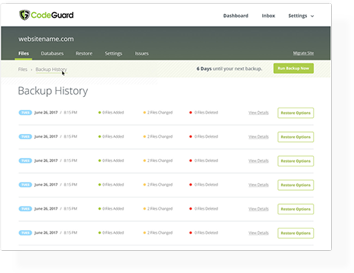
Your website is backed up every day, and if something goes wrong you can restore it to an earlier point in time with a click.
-
 Automatic Daily Backups
-
 Website Time Machine
-
 WordPress Plugin Updates
-
 File Change Alert Monitoring
-
 Malware Detection and Restore

Choose Backup Storage

Daily Automatic Website Backups
Automatic daily backups, stored off-site with built-in redundancy.

Unlimited Files & Databases
Back up any number of files and databases. The only limit is the storage space in your plan.

One-Click Restores
Roll back a single file or your whole website to an earlier version in a few clicks.

Malware Monitoring
CodeGuard checks your website for changes every day, so you'll know if something unexpected happens.

Automatic WordPress Updates
Keeps WordPress and its plugins updated automatically, and rolls back if an update causes problems.

File Change Monitoring
Get an email whenever anything changes in your website's code.

Staging of Restores
Test a backed-up copy of your website on a simple, automatic staging site before you restore it.

Email Backup
Email stored with your website files is backed up too.

Full Automation
Setup and backups are completely hands-free, and you're told automatically if anything goes wrong.
Frequently asked questions
What is CodeGuard?
CodeGuard is a fully automatic website backup service that protects you against data loss and malware.
Why do I need CodeGuard?
CodeGuard keeps an independent, off-site backup of your website, separate from your hosting, and checks every day that your website is online and free of malware.
How does it work?
CodeGuard takes a snapshot of your website every day. You can use those snapshots to restore your whole website, or a single file, to an earlier version at any time.
What if I run out of storage?
You can upgrade to a plan with more storage in a few clicks from your client area.
Where are backups stored?
Backups are stored on Amazon Web Services' Simple Storage Service (S3), which is built for resilience and redundancy.
Are the backups encrypted?
Yes. Backups are stored encrypted to the AES-256 standard.
Do you backup databases?
Yes. CodeGuard backs up MySQL and MSSQL databases as well as your files.
What is File Change Alert Monitoring?
CodeGuard emails you whenever your website's files change, which can be the first sign of a hack or malware.
What happens if my site gets infected?
Because CodeGuard keeps a snapshot from every day, you can restore a clean version from before the attack at any time.
30-day money-back guarantee. If it isn't right for you, cancel within 30 days of buying and we'll refund you in full. Just open a ticket.